A trader we'll call Dan messaged us last spring after a manager he found on Instagram had "grown" his account for three weeks. The manager had asked for his password. Dan sent it. Which password? He didn't know there was more than one. Three weeks later the account was down 60%, the manager had stopped replying, and Dan was asking us whether the trades could be reversed. They couldn't.
The entire disaster came down to a distinction that takes five minutes to learn: the MT4 investor password vs master password question. MetaTrader accounts don't have one key. They have tiers of access, and the gap between the tiers is the gap between someone watching your money and someone controlling it. Almost every management scam, every "trusted friend" dispute, every messy divorce-adjacent trading argument we've seen traces back to somebody handing over the wrong tier.
So this piece is the full technical explainer. What each credential does, precisely. How to set and change each one. Who should ever receive which. And the single rule that sits above everything else: the master password never leaves the account owner. Not for a manager, not for a spouse, not for us. If you remember nothing else, remember that sentence.
The three credentials every MT4/MT5 account has
When a broker opens a live account for you, you get a login number, a server name, and — depending on the broker and the platform generation — up to three passwords. Most people only ever notice the first one.
The master password (MetaQuotes just calls it "the password" in most dialogs, which is part of the problem) grants full trading access. Log in with it and you can open positions, close positions, modify stops, delete pending orders, run Expert Advisors, and change the account's other passwords. On MT5, and with many brokers' client portals, it's also the credential tied to the identity that can request withdrawals or change where money goes. It is the account, in every sense that matters.
The investor password is read-only. Log in with it and the terminal looks almost identical — same charts, same open positions, same history tab — but every trading control is dead. You cannot open, close, or modify anything. You're behind glass. This is the credential MetaTrader built specifically so that someone could verify an account without being able to touch it, and it's criminally underused.
Trade-only access is the middle tier, and it's the one most retail traders have never heard of because it doesn't live in the terminal at all. It lives with the broker. Some brokers can issue a separate trading credential, or more commonly attach a power-of-attorney style permission, that lets a third party trade the account while the withdrawal and profile functions remain locked to the owner's portal login. On MT5 the platform itself distinguishes trading access from account-change rights more cleanly than MT4 ever did. We'll get into the variations later, because they matter and brokers are inconsistent about them.
Here's the thing that trips people up: all three credentials open the same login number on the same server. The terminal doesn't announce which tier you're in with a big banner. On MT4 the only obvious tell is the phrase "Investor mode" quietly appended in the terminal's title bar and the greyed-out trade buttons. Send the wrong string of characters to the wrong person and nothing looks different — until the trades start.
Master password: full control, and it never leaves you
Let's be blunt about what the master password actually represents, because "full trading access" undersells it.
With your master password, a stranger can open 5 lots of XAU/USD on a $2,000 account — a position where a $4 move in gold, which happens before lunch most days, wipes the account. They can close your profitable positions and let the losers run. They can delete the stop losses you placed. They can attach an EA that trades all night while you sleep. And crucially, on most brokers, they can change the investor password and even the master password itself, locking you out of your own account until you go through the broker's support queue to prove ownership.
That last one deserves a second look. The master password can change the other passwords. That means the tiers aren't really parallel; they're a hierarchy with one credential at the top. Whoever holds the master doesn't just have the most access — they control everyone else's access too.
The master password isn't a key to your account. It is your account. Sharing it doesn't grant access; it transfers ownership in everything but name.
And here's the part people learn the expensive way: broker terms almost universally state that trades executed with valid credentials are your trades. If someone logs in with your master password and torches the account, the broker's position — legally defensible and consistently enforced — is that you authorised it by sharing the credential. There is no chargeback. There is no reversal. We've watched people argue this with three different brokers and lose all three times, politely.
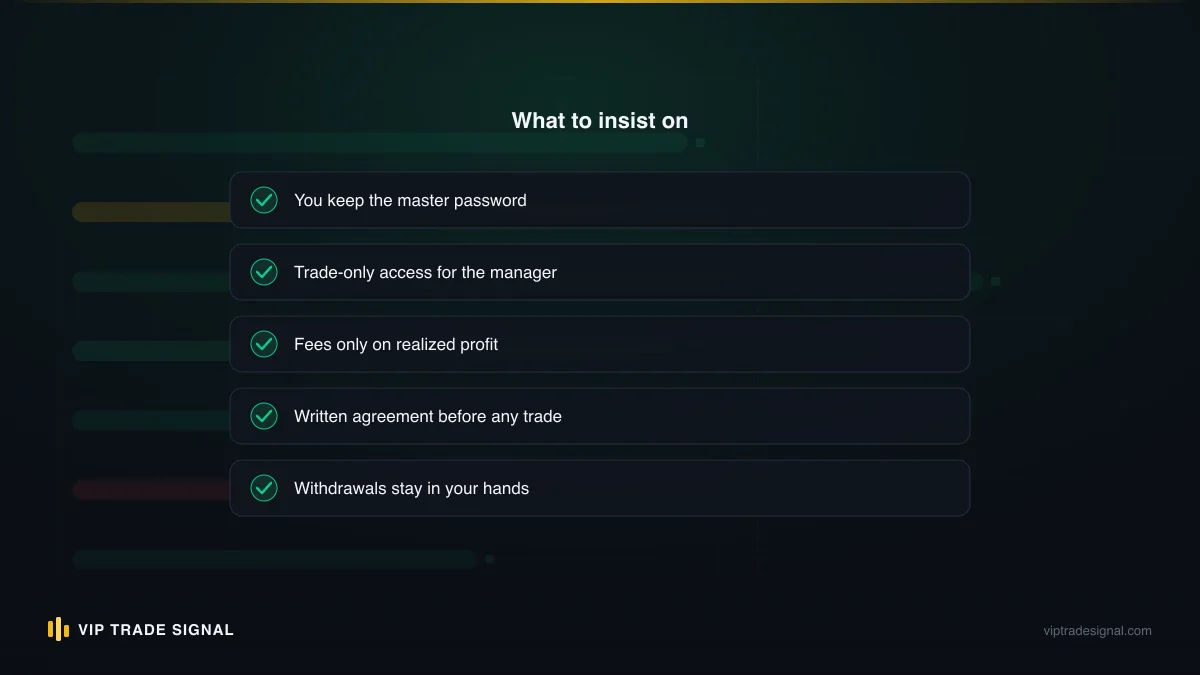
So the rule is absolute, and it's a rule we apply to ourselves. Our own account management service trades clients' MT4/MT5 accounts, and even then the client keeps the master password and full withdrawal control — we work through the trading tier, never the master. Any arrangement, ours or anyone's, that requires you to surrender the master credential has already told you what kind of arrangement it is.
The master password is for exactly one person. You. Not written in a shared note, not saved in a Telegram chat with a manager, not "just this once so they can set up the EA". Once.
Investor password: read-only, share it like a business card
Now the good news. The investor password is the opposite in every way, and you can be almost carefree with it.
What is an investor password in MT4, practically speaking? It's a viewing pass. Log in with it and you see everything that matters: live open positions with their entry prices and floating P/L, the full order history back to the account's opening, the balance, the equity, the margin usage, every chart and timeframe. What you cannot do is act. The New Order button is disabled. Right-clicking a position gives you no close option. Pending orders can't be placed or pulled. EAs won't execute trades. The terminal will happily let you draw trendlines all day, but nothing you do touches the account.
This makes it the perfect verification tool, and verification is where retail trading is starved. Think about what the investor password lets you check that a screenshot never can:
- Whether the "90% win rate" account a manager is advertising actually exists, or is a demo
- Whether the history has been cherry-picked — investor access shows every trade, including the ugly ones
- Whether the equity curve matches the story — a smooth balance line hiding a 40% floating drawdown is visible instantly in the equity figure
- Whether the account is even trading the instrument claimed
We lean on this constantly. When someone asks how to vet a manager or a signal seller, the first question is always: will they give you investor access to a live account? A month of read-only watching tells you more than a year of posted screenshots. It's also why we tell prospects evaluating our management service to ask us the same thing — the standard applies to everyone, us included, and a provider who squirms at read-only scrutiny while asking for full control of your money has answered the question for you.
One practical wrinkle: how do you confirm which mode you're actually in? On MT4, look at the terminal's title bar — investor mode appends the word "investor" after the account number, and the New Order button sits greyed out on the toolbar. On MT5 it's similar, with the account state shown in the lower-right connection area. This matters more than it sounds, because both passwords open the same login, and if you're testing what a third party can see, you want certainty you logged in with the credential you think you did. The clean test: try to place a 0.01-lot order. Investor mode refuses. If it goes through, you're holding more access than you meant to check, and possibly more than you meant to give.
Is there any risk in sharing it? Small, but not zero, so let's be honest about it. Someone with investor access can see your balance and your strategy. If you're running a large account, that's information — a bitter ex-business partner knowing your equity, or a counterparty seeing your positioning, isn't nothing. And a scammer who's collected your investor password knows exactly how big a fish you are before they start the real social engineering. So "share freely" means freely with people who have a reason to see it, not posted in a public channel. But compared to the master password, the blast radius is a firecracker next to a landmine.
Trade-only access: the tier managers should actually use
Here's the tier that solves the management problem properly, and the fact that most traders don't know it exists is why the master-password scam keeps working.
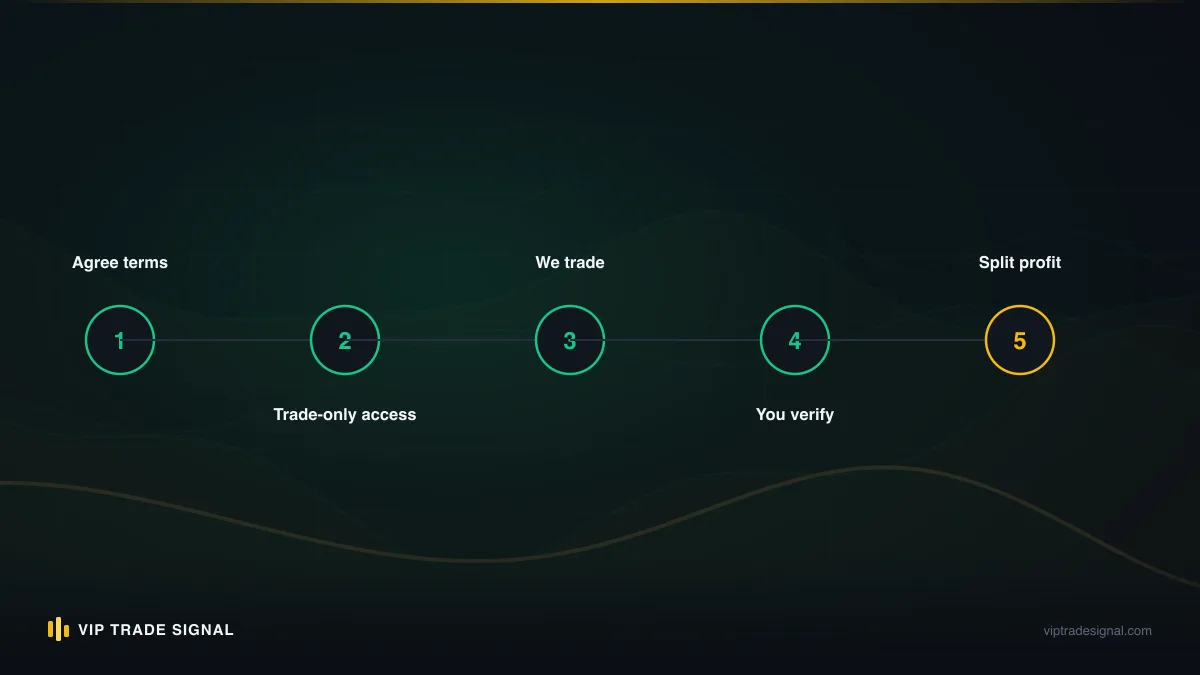
Trade-only access to a forex account means a credential or permission that can open, close, and modify positions — everything a manager legitimately needs — while having no path to withdrawals, no ability to change the account's profile or passwords, and no access to the broker's client portal where the money actually moves. The trading happens on the platform. The money lives behind the portal. Separate those two and the worst a bad manager can do is trade badly, which is a real risk but a bounded one.
How you get this tier varies, and this is where MT4's age shows:
On MT4, the platform itself only really knows two states: full access and investor mode. So trade-only separation is implemented broker-side. The common mechanisms are a Limited Power of Attorney (LPOA) form naming the manager, a sub-account structure where the trading account holds only the capital you've allocated, or — at brokers built for this — MAM/PAMM structures where the manager trades a master account and never sees your credentials at all. If PAMM structures are new to you, we've written a full breakdown in our PAMM account guide, and a comparison piece on PAMM vs MAM vs copy trading that covers which structure fits which situation.
On MT5, MetaQuotes finally split the permissions more sensibly. The platform distinguishes trading rights from configuration rights, and brokers can issue API-based or portal-based trading permissions with real granularity. Some let you toggle "trading only" on a credential from your own portal, no forms involved.
The practical middle path most people actually use: open a dedicated account for management, fund it with only the amount you're comfortable allocating, and keep your main capital elsewhere. Even if the manager holds full platform access to that account, the portal login — and therefore the withdrawal rail — stays with you, and the exposure is capped at what you deposited. It's not as clean as true trade-only permissioning, but it's a workable fence, and it's the structure we use ourselves: your account, your broker, your portal, our trading access, and every withdrawal request comes from you because we couldn't submit one if we wanted to.
Notice what this tier costs a legitimate manager: nothing. Every honest management operation can work within it. Which sets up the most useful diagnostic in this entire article, and we'll get to it shortly.
The permission matrix: what each credential can and cannot do
Words are fine, but this is genuinely clearer as a table. Pin this mentally, or literally.
| Action | Master password | Trade-only / LPOA | Investor password |
|---|---|---|---|
| View charts, positions, history | Yes | Yes | Yes |
| See balance, equity, margin | Yes | Yes | Yes |
| Open and close trades | Yes | Yes | No |
| Modify stops and pending orders | Yes | Yes | No |
| Run Expert Advisors (trading) | Yes | Yes | No |
| Change investor password | Yes | No | No |
| Change master password | Yes | No | No |
| Access broker client portal | Usually linked | No | No |
| Request withdrawals | Via portal identity | No | No |
| Change account profile/email | Via portal | No | No |
Two rows deserve a highlight. First, "change investor password" sits with the master — so if you've shared investor access with someone and later want to cut them off, you can rotate the investor password yourself in about thirty seconds, and their access dies instantly. Handy. Second, look at the withdrawal row: no MT4 password type moves money directly. Withdrawals go through the broker's client portal, which has its own separate login. This is exactly why the scammer's real target is often not the platform password at all but your portal credentials or email — and why "I need your master password to process your profit withdrawal" is a sentence that should end the conversation on the spot. Nobody needs a platform password to send you money. Ever.
A quick word on that portal login, since it sits just outside the MT4 password family but controls the thing everyone actually cares about. Treat it like a bank login, because functionally it is one. Unique password, two-factor authentication on, and the email account behind it secured hardest of all — because "reset password via email" makes your inbox the true master credential of your entire trading life.
Setting and changing each password, step by step
Enough theory. Here's the actual clicking, because half the security failures we see aren't philosophical — they're people who never changed the auto-generated password the broker emailed them in plain text.
Changing the master password in MT4
- Log into the terminal with your current master password.
- Go to Tools → Options (or Ctrl+O), open the Server tab.
- Click Change next to the password field.
- Enter your current password, select Change master password, type the new one twice.
- Click OK. You'll stay logged in; the change is immediate on the server.
MT4 wants at least two of three character classes (upper, lower, digits) and a minimum length that varies by broker, usually five characters, which is laughably short — go to twelve or more regardless of what the minimum allows. And if the broker originally emailed you this password, changing it isn't optional housekeeping. Plain-text email is a postcard. Assume anything that arrived in one has been read.
Setting or changing the investor password
Same dialog, one different radio button:
- Tools → Options → Server → Change.
- Enter the master password as the current password.
- Select Change investor (read only) password.
- Enter the new investor password twice, click OK.
Note the mechanics: you authorise the change with the master password. Investor mode cannot change any password, including its own — which is what makes it safe to share. Some accounts ship without an investor password set at all; this same dialog is where you create one.
On MT5
Nearly identical: Tools → Options → Server, click the password field's change button, and the dialog offers master and investor changes the same way. MT5 also surfaces password changes in some brokers' web terminals and portals, which honestly is where more of this belongs.
Through the broker portal
Every serious broker also lets you reset both platform passwords from the client area, which is your recovery path if you've forgotten the master or — worse — someone changed it on you. Portal reset overrides whatever was set on the platform. This is worth knowing in an emergency: if you ever suspect your master password has leaked, the portal reset is faster than the terminal and works even if the attacker changed the password already.
One habit worth stealing: rotate the investor password on a schedule tied to relationships, not time. Manager trial ended? Rotate. Sent it to a prospect group three months ago? Rotate. It costs thirty seconds and resets your exposure to zero people.
Sharing scenarios: who gets which credential
Abstract rules bend under real situations, so let's run the actual cases.
A money manager or account management service. Trade-only access where the broker supports it; a dedicated, ring-fenced account where it doesn't. Never the master password of an account holding money you can't afford to lose entirely. A proper manager will suggest this structure before you do — when we onboard a management client, the setup conversation is explicitly about what we don't get, and the answers to the practical questions (who holds what, how the 50% profit split is calculated, what the $200 advance covers) are all on our FAQ rather than buried in a DM. Any manager whose onboarding is "send me your login and password" has designed their process around control, and you should read that as the disclosure it is.
A spouse or family member. Depends entirely on what they need. If they want to see how the trading's going — investor password, done. If this is genuine shared money and shared decisions, the honest answer is a joint conversation with the broker about account structure, not a whispered master password. And if the thought experiment "what happens to this access if we fall out" makes you wince, that's your answer about which tier to share. Passwords outlive relationships. Rotations exist for a reason.
An accountant or tax preparer. Investor password, or better, just export the reports — right-click in the Account History tab, save the detailed statement as HTML. They need the trade history for the tax year, not a live window into your margin level. Most accountants would rather have the file anyway.
A prospect you're trying to convince. If you're the one selling — you run signals, you manage money, you want someone to trust your track record — investor access to your live account is the strongest evidence you can offer, precisely because it can't be faked in post. Give it. Watch how much faster the conversation moves than with screenshots. (This cuts both ways: it's why we publish every closed signal, wins and losses, rather than asking anyone to take our word.)
A signal service. Trick question. A signal service needs no access to your account at all — not investor, not anything. You receive levels, you place trades. Any "signal" provider requesting account credentials has moved out of the signal business and into a different one, usually without telling you. Our own signal side, whether the $99/month plan or free via a partner broker, never touches your account, because there's no legitimate reason for it to.
An EA vendor or "account doctor". This one's a modern classic: someone offers to install or tune an Expert Advisor and needs your password "just for setup". No. EAs install on your terminal, on your machine; if remote help is genuinely needed, a screen-share where you type the password yourself covers it. The number of accounts drained through the setup-help pretext would depress you.
What a manager asking for your master password is really telling you
Let's linger here, because this is the highest-value paragraph in the piece for anyone currently talking to a prospective manager.
There is no technical task in account management that requires the master password. Trading? Trade-only access covers it. Monitoring? Investor covers it. EA deployment? Happens terminal-side with trading access. Withdrawing your profits to you? Goes through your portal, which they shouldn't touch anyway. We run a management desk; we've handled every operational wrinkle these arrangements produce, from EA migrations to broker server changes, and not once has the master credential been necessary. It's not a convenience they're asking for. It's the withdrawal-adjacent control and, above all, the ability to lock you out.
So a forex account manager asking for your password — the master one — has told you one of two things. Either they don't understand MetaTrader's permission tiers, in which case they're too inexperienced to trade your money. Or they understand them perfectly and want the tier that controls your access anyway, in which case the plan doesn't have your interests in it. Incompetent or predatory. There's no third reading, and you don't need to figure out which one it is, because both end the conversation.
Watch for the softer versions too. "Our system needs full access to manage risk properly." It doesn't; risk is managed with trading access. "The master password is required for our copier." Copiers run on trading credentials. "We'll change it to something only we know, for security." That one's almost admirable in its honesty — they're describing a lockout as a feature. And the pressure variants: the deadline, the "spots filling", the profit you're supposedly already missing. Urgency around credential handover is itself the tell. Legitimate structures survive a week of your due diligence. Scams can't afford to.
The mirror test applies to us as much as anyone: we're not a licensed advisor, our management fee sits at the high end of the market at a flat 50% of realized profit, and the reason clients accept that structure is precisely that the control never moves — master password and withdrawals stay theirs from day one to whenever they walk. High fee, low trust-requirement. We think that trade is honest. The inverse — low advertised fee, total credential surrender — is the shape of nearly every management horror story we've been shown.
How the lockout actually plays out
It's worth walking through the mechanics of a credential takeover once, slowly, because knowing the sequence is what lets you interrupt it. Back to Dan, since his case followed the standard script almost beat for beat.
Week one, nothing bad happens. That's deliberate. The manager trades small, posts Dan a couple of modest green days, builds the comfort that makes week three possible. Somewhere in that first stretch, quietly, the investor password gets changed — remember, the master can rotate it — so that if Dan ever shares read-only access with a sceptical friend, the friend can't get in. Then the account's attached email or phone number gets "updated for notifications". Dan approved that one himself, actually; the manager framed it as connecting their monitoring system.
Week two, position sizes grow. If the trades happen to win, the manager pitches a top-up — this is where the real money is made, because the second deposit is always bigger than the first. If they lose, the sizes grow anyway, because it isn't the manager's money and a blown account costs them nothing but a burner Telegram handle.
Week three, Dan gets nervous and tries to log in. His password doesn't work. Support asks him to verify through the email on file — which is no longer his. By the time ownership is re-established through ID documents, five business days later, the balance is a rounding error. Not withdrawn, note; the platform passwords can't move money. Just traded into the floor, sometimes deliberately, into the other side of positions held elsewhere.
Every step of that sequence dies at the first one if the master password never moves. The rotated investor password, the swapped email, the lockout — all of it requires the top of the hierarchy. Hold that, and the worst case shrinks from "everything" to "the trades were bad", which is a risk you can at least size in advance.
Broker-side variations you should actually check
MetaTrader is the platform, but your broker configures it, and the differences bite in exactly the moments you care about. Five things worth checking with yours before you share anything:
Whether an investor password exists by default. Some brokers generate one at account opening and email it alongside the master (in the same plain-text email, naturally — rotate both). Others leave it unset until you create it in the terminal. If you've never set one and never received one, assume you don't have one yet.
Whether the platform password and portal login are unified. A growing number of brokers sync the MT4/MT5 master password with the client-area login, which quietly raises the stakes: leak the master and you may have leaked the withdrawal rail too. Ask directly. If they're unified, treat the master with bank-vault paranoia and lean harder on ring-fenced accounts for any shared arrangement.
How LPOA and trade-only permissions work, if at all. Ask: "Can a third party be granted trading access to my account without holding my passwords, and how is it revoked?" The quality of the answer tells you a lot about the broker, too. Good ones have a form and a process. Bad ones say "just share your login".
What the password reset chain looks like. Does a reset go to your email? SMS? Can support reset it on a phone call with just your date of birth? The weakest link in that chain is your account's real security level, whatever the password itself looks like.
MT4 versus MT5 handling. If you're on MT5 or migrating, the permission model is more granular and some brokers expose it properly — separate trading credentials, portal-managed access, per-credential revocation. If you're setting up a managed arrangement from scratch in 2026, MT5's model is a genuine reason to prefer it. For a fuller picture of how managed accounts are structured end to end, our piece on MT4/MT5 account management services walks the whole arrangement, fees and all.
None of this takes more than one email to your broker's support desk. Send it before you share credentials, not after something's gone sideways, because after is when you discover the reset chain runs through an email address the manager helpfully "updated" for you.
The one-minute security audit of your current setup
Right now, while the article's open, run through this. Sixty seconds, honestly.
- Is your master password still the one the broker emailed you? If yes, it's been sitting in plain text in at least two inboxes for however long you've had the account. Change it now — Tools, Options, Server, ninety seconds, we covered it above.
- Do you know who currently holds your investor password? If the list is fuzzy, rotate it. Fuzzy means too many.
- Has your master password ever been shared with anyone, for any reason, ever? Then rotate it today regardless of how much you trust them, because their security is now your security — their reused passwords, their compromised laptop, their Telegram account.
- Is your broker portal password different from your platform password, with 2FA on? If they match, one leak takes both tiers plus the money rail.
- If you have a manager: which tier do they actually hold? Not which tier the agreement mentions — which tier works when you test it. Log in with what they were given and try to open a 0.01-lot trade. The result is your answer.
- Could you cut off every third party in the next five minutes if you had to? If the answer involves contacting anyone other than yourself and your broker, your access control has a dependency it shouldn't have.
Most accounts we've helped audit fail question one alone. It's not a character flaw; the broker's welcome email presents the passwords as done, and nothing ever prompts you to revisit them. But security that was set once in 2022 and never touched isn't security. It's an assumption with a login number.
Where this leaves you
The MT4 investor password vs master password distinction isn't trivia. It's the entire architecture of trust in retail trading, compressed into two strings of characters. One string is a window. The other is the deed to the house. Every dispute, every drained account, every "he seemed legit" story runs through someone treating those two things as interchangeable.
So here's the position we'd defend at the pub. Share investor access generously — it's the best verification tool this industry has, and both sides of a management or signal relationship are healthier when read-only proof replaces screenshots and promises. Grant trading access deliberately — through broker-side permissions or ring-fenced accounts, sized to what you'd genuinely survive losing, because managed trading carries real risk of loss no matter who's driving. And guard the master password absolutely, from everyone, including people you're paying and people you love. There is no relationship, commercial or personal, that requires it and no legitimate operation that can't work without it.
If you're weighing up managed trading specifically, structure the conversation around access before you ever discuss returns. Ask the prospective manager — us included — exactly which credential they need and why, and watch whether the answer respects the tiers or bulldozes them. The manager who explains, unprompted, why they don't want your master password is showing you their incentives. The one reaching for it is too.
Your account. Your master password. Everyone else gets glass to look through or a fence to trade inside. That's the line, and now you know exactly where it sits.